
Detect-A-Finger®: Drop-Probe Safety for Welders & Riveters
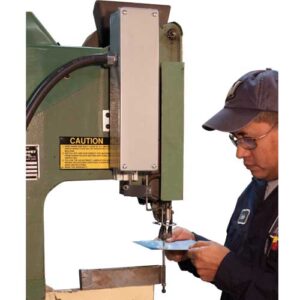
Detect-A-Finger® Prevents Welding and Riveting Injuries
Preventing hand and finger injuries on manufacturing equipment is a top priority for safety and compliance professionals. Detect-A-Finger is a drop-probe presence-sensing safety device for spot welders and riveters, designed to stop a machine’s cycle if a finger or hand is detected in the danger zone. By halting the machine before an injury can occur, Detect-A-Finger helps companies align with OSHA’s machine guarding requirements (29 CFR 1910.212) for point-of-operation safety. This retrofit-friendly device is widely used in U.S. manufacturing to prevent serious point-of-operation injuries and maintain OSHA compliance.
What Is Detect-A-Finger®?
Detect-A-Finger® is a mechanical drop-probe safety device that acts as a “last line of defense” against finger and hand injuries at the point of operation. It consists of a sensing probe (sometimes called a drop-probe rod) connected to a control unit. Whenever an operator initiates a machine cycle – typically by pressing a foot switch – the sensing probe drops gravity toward the work area. If anything, thicker than the normal workpiece (for example, a finger) is in the way, the probe will contact it and prevent the machine from cycling. If the area is clear, the probe completes its full downward stroke and allows the machine to proceed with the weld or rivet. In essence, the drop-probe acts as a presence-sensing device at the point of operation: it detects the presence of a person’s finger or other obstruction and immediately interlocks with the machine controls to halt the cycle. This simple but effective design keeps operators’ hands out of harm’s way and stops hazardous machine motion before an injury can occur.
Typical use cases for Detect-A-Finger include spot welding machines and pneumatic or mechanical riveting machines. These smaller machines often rely on an operator to manually position parts and actuate the cycle, which brings hands close to dangerous moving parts. A drop-probe device like Detect-A-Finger adds an extra layer of protection during each cycle. Notably, the Detect-A-Finger system is fail-safe – the probe must drop and confirm a clear work area every cycle, meaning the operator cannot bypass or forget this safety step. By automatically enforcing this check, the device ensures that safeguarding cannot be deactivated or overlooked by the operator.
How the Drop-Probe Works (Step-by-Step)
Even though the drop-probe mechanism is mechanically simple, it’s important to understand how each cycle operates. Here’s how Detect-A-Finger works in four simple steps:
Cycle Initiation
The operator presses the machine’s start control (usually a foot switch). This action energizes the Detect-A-Finger control box and releases the probe, which drops downward by gravity toward the point of operation.
Sensing for Obstructions
As the probe descends, it gauges the space where the tooling closes. If a finger, hand, or any obstruction (anything thicker than the intended material) is present, the probe contacts it and immediately stops the machine from cycling. The machine will not start its weld or rivet stroke.
Cycle Proceeds if Clear
If the area is clear (only the workpiece is present), the probe travels to its full down position and activates a limit switch in the control box. This signals the machine’s control system to proceed with the cycle, allowing the welding or riveting operation to occur. The probe then automatically retracts to its starting position (often via a spring return or solenoid).
Compact, Flexible Mounting
The entire drop-probe assembly is compact and typically mounts to the side of the machine’s frame. Different probe rod shapes and lengths can be used or adjusted to fit around various tooling setups. This means the Detect-A-Finger can be installed on either the left or right side of a welder or riveter, and the probe can reach fixtures without impeding the operation.
By enforcing a quick “check” for any finger in the danger zone on every cycle, Detect-A-Finger ensures that the machine only operates when the area is safe. This step-by-step safety sequence significantly reduces the risk of amputations and pinch-point injuries during welding or riveting work.
Models & Typical Use-Cases
Rockford Systems offers the Detect-A-Finger drop-probe device in a few different models to suit various machine types and applications. Each model is retrofit-friendly, meaning it can be added to existing equipment with minimal modification. Here are three common configurations of Detect-A-Finger and their typical use-cases:
RKC-000: For Smaller Fastening Machines
Use case: Ideal for small machinery such as pneumatic riveters, eyelet machines, stakers, staplers, crimpers, and other fastening or assembly stations. This model is a general-purpose drop-probe designed to fit compact machines where operators work in close proximity to the point of operation. It’s often used as a retrofit solution on older riveting machines that lack modern guarding. The RKC-000 series of drop-probe helps prevent finger injuries on these machines by stopping the cycle if an obstruction is sensed. Its compact size and adaptable mounting make it easy to install without significant rework to the machine. (Note: The latest generation of this device is sometimes referred to as the Gen II drop-probe for riveters, with models like RKC008 and RKC009 corresponding to left- or right-mount configurations. These newer units feature an extended sensing stroke and improved ease of installation.
RKC-500: For Spot Welders
Use case: Designed specifically for spot welding machines, the RKC-500 model mounts either to a stationary welder frame or to a moving welder arm (such as the upper arm of a rocker-arm spot welder). It provides a protective sensing probe for welding operations, ensuring the electrodes cannot clamp or fire if a finger or hand is too close to the pinch-point. In spot welding applications, some machines use a two-stage foot pedal (one stage to initiate, second to complete the weld) – the RKC-500 integrates with these controls to add a safety check before the weld occurs. For welders that use old mechanical foot pedals, a common retrofit is to replace the mechanical pedal mechanism with an air-cylinder actuated foot switch that interfaces with the Detect-A-Finger control box. This ensures the drop-probe safety system can reliably interrupt the cycle if needed. Learn more about the Detect-A-Finger Drop-Probe Device for Welders (RKC-500) on our product page.
DAF-100: Premium Adjustable Kit
Use case: The DAF-100 is a premium Detect-A-Finger kit that includes an adjustable-stroke probe assembly and a dedicated control box. It’s suitable for both riveters and spot welders, especially when a larger or adjustable sensing range is needed. This model features an adjustable probe stroke (up to approximately 4 inches), allowing it to accommodate different machine sizes and deeper-set tooling. The kit comes with everything needed to add the drop-probe system to a machine, including the sensing probe, mounting hardware, and an electrical control unit that interfaces with the machine’s controls. The DAF-100’s adjustability makes it a versatile choice for safeguarding a variety of small machines – from resistance welders to assembly presses – all with one solution. Companies often choose this model when they have a mix of riveters and welders or when they want the flexibility to fine-tune the probe’s drop distance. It’s a comprehensive safeguarding upgrade for those looking to maximize safety across multiple machines.
Compliance & Risk Reduction
In addition to preventing injuries, Detect-A-Finger plays a significant role in regulatory compliance and overall risk reduction. OSHA’s general machine guarding standard 29. CFR 1910.212 requires employers to safeguard operators from hazardous machine parts, including the point of operation where the work is performed. By installing a Detect-A-Finger drop-probe device on a spot welder or riveter, companies add a compliant guarding method that actively protects the operator’s fingers from pinch-point hazards. The device essentially serves as an engineered control to meet OSHA requirements: if a finger is in the danger area, the machine cannot cycle, thereby preventing an amputation or crush injury that would violate safety standards.
However, it’s important to note that no single device guarantees full compliance or safety. A drop-probe device should be one component of a comprehensive safety program. Rockford Systems recommends pairing hardware solutions like Detect-A-Finger with a Machine Safeguarding Assessment and ongoing training. A professional safeguarding assessment will evaluate all hazards on the equipment (not just the point of operation) and ensure that the machine’s controls, guards, and safety devices work together to meet OSHA and ANSI standards. Additionally, documented validation (such as stop-time measurements to verify the machine stops quickly enough) and proper employee training are crucial for a complete compliance program. For example, after installing Detect-A-Finger, you should verify the machine’s stopping performance and train operators on the new safety feature, so they understand its purpose and function.
Installation & Integration Tips
Installing a Detect-A-Finger drop-probe device is straightforward, but there are best practices to ensure it functions effectively with your machine. Here are some practical tips for integration:
Mounting Location
Determine whether to mount the drop-probe assembly on the left or right side of the machine. It should be positioned so that the probe can drop directly into the point-of-operation without obstruction, and the probe rod should be able to fit around the tooling or workpiece. Use the provided rigid mounting brackets to ensure they are securely attached to the machine frame to prevent any movement or misalignment.
Probe Alignment
When setting up the sensing probe, adjust it to the correct length and shape (if using a bendable template rod) so that it covers the hazard area. The probe should enter the space between tooling (e.g., welding electrodes or riveting dies) far enough to detect a finger, but not so far that it interferes with normal operation. Tip: Many users first shape a soft aluminum template rod (included in some kits) to match the workspace, then cut or bend the steel probe rod accordingly.
Foot Switch Configuration
Evaluate your machine’s foot pedal or cycle initiation method. If the machine uses a mechanical foot pedal, it may need to be modified or replaced. Mechanical linkages might not easily integrate with the electrical interlock of the drop-probe. Replacing a mechanical pedal with an air-cylinder-actuated foot switch (or an electric foot switch like Rockford’s CTD series) is often recommended. This allows the Detect-A-Finger control box to directly enable or block the foot switch signal electrically, ensuring that a blocked probe truly prevents the cycle.
Electrical Integration
Follow the wiring diagrams and instructions provided by Rockford Systems for connecting the Detect-A-Finger control box to your machine’s control system. The device typically includes its own safety relay and limit switches. Make sure to integrate these so that the machine’s clutch or actuator will not engage unless the drop-probe limit switch confirms a clear condition. For hydraulic or pneumatic machines, you’ll usually tie the drop-probe controller into the existing control valve circuit, or the machine’s PLC/relay logic controlling the cycle.
Stop-Time Validation
After installation, perform a stop-time measurement or functional test to verify that the machine stops quickly enough when the probe is blocked. The probe will halt the initiation of a cycle, but if the machine has any residual motion (for instance, in a part-revolution mechanical press application), you need to ensure that motion ceases before the hazard can cause an injury. Record these test results and maintain documentation as part of your safety validation. Regularly inspect and test the drop-probe device (e.g. at the start of each shift) to make sure it’s functioning correctly.
Operator Training & Awareness
Train all operators and maintenance personnel on how the Detect-A-Finger system works. They should understand that if the probe is triggered (for example, if it touches their hand), the machine will not cycle – and this is a deliberate safety feature. Emphasize that they should never attempt to tamper with or disable the device. Also, install the provided warning/danger labels on the machine as instructed, so that anyone using the equipment is aware of the new safety device and the requirement to keep the area clear.
By following these installation tips, you’ll integrate the Detect-A-Finger smoothly and ensure it performs as intended. Proper setup and maintenance of the device are key to reliable injury prevention.
When Detect-A-Finger® Is the Right Fit
Not every machine or operation will use a drop-probe device, but certain scenarios are especially well-suited for Detect-A-Finger safeguarding. Consider using a Detect-A-Finger drop-probe if you have:
Spot welders with manual loading
For resistance welders where operators frequently place parts and their hands near the electrodes, a drop-probe adds protection against sudden cycle starts. This is common in high-mix welding operations or older spot welders without light curtains.
Riveting or fastening machines with close operator access
Any small machine (riveter, eye letter, stapler, crimper, etc.) where the operator’s hands are near the tooling during each cycle can benefit from a Detect-A-Finger. These devices excel at preventing pinch-point injuries on riveters that lack enclosures or physical guards.
Retrofit situations where light curtains or guards are impractical
In some setups, installing a two-hand control, barrier guard, or light curtain might be difficult due to space constraints or the need for frequent part handling. A drop-probe is a compact alternative that can often be mounted in tight spaces and doesn’t hinder the workflow, making it ideal for retrofitting legacy equipment.
High-mix or low-volume operations
If your production involves many different part sizes or frequent changeovers, elaborate guarding setups can slow things down. Detect-A-Finger devices are flexible and easy to adjust for different jobs, making them suitable for work cells where versatility is needed without sacrificing safety.
Supplemental safety for partial automation
Even if a machine has some safeguarding, you might add a drop-probe as an extra layer. For example, if an older welder has an existing interlock but no point-of-operation protection, the Detect-A-Finger can provide that additional assurance. It’s also a consideration for companies looking to incrementally improve safety on equipment that can’t be fully enclosed or automated.
In these cases, a Detect-A-Finger system can dramatically reduce the risk of injury with minimal impact on productivity. It’s often the right fit when you need a cost-effective, quick safety upgrade that still meets OSHA guarding requirements.
Related Safeguarding Solutions
While drop-probe devices are excellent for many applications, it’s worth remembering that they are one of several tools in the machine safeguarding toolkit. Depending on your machinery and processes, you might also consider these related safeguarding solutions (often used in combination with Detect-A-Finger for comprehensive safety):
Two-Hand Control Systems
Requiring the operator to press buttons with both hands (instead of using a foot pedal) can keep hands away from danger during the machine cycle. Two-hand control modules or palm button stations are commonly used on presses and can be an alternative for some riveters or welders. (This method could be used in place of or alongside a drop-probe in certain situations, although it may reduce efficiency for high-cycle operations.)
Safety Foot Switches
Upgrading to heavy-duty safety-rated foot switches with anti-tiedown features can improve operator safety. For example, a foot switch with a covered pedal or a double-stage actuation can prevent accidental presses. Rockford Systems offers foot switches designed for use with proper point-of-operation safeguards – these can be integrated with drop-probe devices or other controls to ensure the machine only cycles when intended.
Light Curtains and Presence-Sensing Devices
For some machinery, safety light curtains or area scanners can be used to detect hands or bodies entering hazardous zones. Light curtains create an invisible barrier – if the barrier is broken, the machine stops. They’re a higher-end solution often used on larger machines or where an open workspace must be maintained. (For instance, a light curtain could be used on a large spot-welding station, while a Detect-A-Finger covers the small point-of-operation on a benchtop riveter.)
Annual Safeguarding Audits
Regular safety audits or machine safeguarding assessments by qualified professionals help identify any gaps in protection. An annual audit can catch changes in machine use, wear and tear on safety devices, or new hazards introduced by tooling modifications. This ensures that devices like Detect-A-Finger remain effective and that your overall safeguarding strategy stays up to date.
Operator Training and Safety Workshops
Don’t overlook human elements. Providing ongoing operator training in machine safety, proper use of safeguarding devices, and emergency response is vital. Rockford Systems offers training programs and workshops (covering OSHA/ANSI compliance, machine guarding, lockout/tagout, etc.) which can greatly enhance your team’s safety awareness. In fact, a well-trained operator is more likely to use equipment correctly and respect safeguards like Detect-A-Finger, rather than attempting to bypass them.
By combining these solutions as needed, you create a robust, layered approach to machine safety. For example, you might use two-hand controls on one machine, a drop-probe on another, and light curtains on a third – each selected based on what’s most effective for the specific hazard. Rockford Systems can help integrate all of these elements into a cohesive safeguarding system that fits your production needs while keeping employees safe.
Detect-a-Finger FAQs
What is a drop-probe safety device?
It’s a presence-sensing safety device that uses a mechanical probe which drops into a machine’s point of operation at the start of each cycle. If the probe encounters anything thicker than the normal material (such as a finger or hand), it prevents the machine from cycling. Essentially, it ensures the work area is clear of people before allowing the machine to perform a dangerous motion. Drop-probe devices like Detect-A-Finger are commonly used on small machines (welders, riveters, etc.) to stop cycles that would otherwise cause pinch-point injuries.
Which Detect-A-Finger model should I use?
That depends on your machine’s type and needs. RKC-000 series devices (including the latest Gen II models for RKC008/RKC009) are typically used on smaller fastening machines like riveters, eyeletters, staplers, and similar equipment. The RKC-500 model is designed for spot welders and integrates with their foot pedal controls. The DAF-100 kit is a premium option that works for both riveters and welders, offering an adjustable probe stroke and a complete control package. In short: use RKC-000 (Gen II) for most riveters and small machines, RKC-500 for spot welders, and DAF-100 if you need an all-in-one adjustable solution. If in doubt, consult Rockford Systems for guidance or refer to our drop-probe device catalog for specifications.
Does Detect-A-Finger help with OSHA compliance?
Yes. Detect-A-Finger is specifically designed to align with OSHA’s machine guarding requirements (29 CFR 1910.212) by providing a safeguard at the point of operation. It prevents the machine from cycling when fingers are in the danger zone, thereby protecting the operator as OSHA mandates. However, remember that compliance is a combination of having the right equipment and following proper procedures. While installing a drop-probe device addresses the point-of-operation guarding aspect, you should also ensure you have a full safety program in place (risk assessments, training, lockout/tagout, etc.) for complete OSHA compliance. Detect-A-Finger will significantly aid compliance for point-of-operation hazards, especially when used as part of an overall safeguarding strategy.
Can it retrofit older equipment?
Absolutely, Detect-A-Finger drop-probe devices are designed to retrofit onto a wide range of older machines – from decades-old spot welders to antique riveters – that were built before modern safety standards. The compact, self-contained design means it can often be added without major modifications to the machine. In some cases, you might need to update a foot pedal or add an actuator, but the core drop-probe system can be mounted and integrated into most machine controls. Many manufacturers choose Detect-A-Finger as a cost-effective way to upgrade legacy equipment with current safety technology, extending the usable life of the machine while greatly improving operator safety.
Conclusion & Next Steps
Investing in a Detect-A-Finger® drop-probe device is a smart, proactive step toward preventing grievous hand injuries and ensuring compliance with machine guarding laws. This simple yet powerful safeguarding device keeps your operators safe without hindering productivity, making it ideal for the fast-paced environments of metal fabrication, automotive assembly, appliance manufacturing, and more. If you have machinery with pinch-point risks – especially spot welders or riveters – now is the time to evaluate whether a drop-probe solution is the right fit for you.
Reduce injury risk and align with OSHA 1910.212: Get a Machine Safeguarding Assessment. Our team can inspect your equipment, recommend the appropriate Detect-A-Finger model, and help you implement a comprehensive safety strategy that protects your workers and your business. Act now to safeguard your workplace and give your team confidence that every machine they operate is as safe as possible.